(二)圆弧与圆
创建圆弧的函数是:
| 函数 | 输入与创建方法 |
| Arc(center As Position, axisX As Vector, axisY As Vector, radius As Double,angle1 As Double, angle2 As Double) | (中心位置,X矢量,Y矢量,半径,起始角,终止角) |
| Arc(center As Position, matrix As Orientation,radius As Double, angle1 As Double, angle2 As Double) | (中心位置,矩阵作为导向,半径,起始角,终止角) |
| Arc(center As Position, radius As Double, angle1 As Double, angle2 As Double) | (中心位置,半径,起始角,终止角)
圆弧与XY平面平行 |
| Arc(cx As Double, cy As Double, radius As Double, angle1 As Double, angle2 As Double) | (X坐标,Y坐标,半径,起始角,终止角)
圆弧在XY 平面上. |
| Fillet(p0 As Position, pa As Position, p1 As Position, double radius) | (起始位置,通过位置,结束位置,半径) |
创建圆的函数:
| 函数 | 输入与创建方法 |
| Circle(center As Position, axisX As Vector, axisY As Vector, radius As Double) | (中心位置,X矢量,Y矢量,半径) |
| Circle(center As Position, radius As Double) | (中心位置,半径) 在XY平面画圆 |
| Circle(cx As Double, cy As Double, radius As Double) | (X坐标,Y坐标,半径) 在平行于XY平面画圆 |
| Circle(center As Position, axisZ As Vector, radius As Double) | (中心位置,Z轴矢量,半径) |
| Circle(p1 As Position, p2 As Position, p3 As Position) | (位置1,位置2,位置3) |
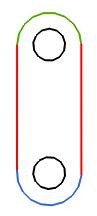
直线与圆弧实例:
Dim length As Double = 8
Dim width As Double = 4
Dim half As Double = width/2
Dim holeDiameter As Double = half
Line(-half, 0, -half, length) ' 左边直线
Line( half, 0, half, length) ' 右边直线
Arc(0, length, half, 0, 180) ' 顶部圆弧(绿色)
Arc(0, 0, half, 180, 360) ' 底部圆弧(蓝色)
Circle(0, length, holeDiameter/2) ' 顶部圆孔
Circle(0, 0, holeDiameter/2)
圆弧属性:
| 数据类型 | 属性 | 数据权限 | 描述 |
| Double | Radius | get, set | 圆弧半径. |
| Position | Center | get, set | 圆弧中心(in absolute coordinates). |
| Vector | AxisX | get | 圆弧沿X轴的单位矢量 (where angle = 0). |
| Vector | AxisY | get | 圆弧沿Y轴的单位矢量 (where angle = 90). |
| Vector | AxisZ | get | 圆弧沿Z轴的单位矢量 (normal to its plane). |
| double | StartAngle | get | 起始角 (度数). |
| double | EndAngle | get | 终止角(度数). |
| Position | StartPoint | get | 圆弧起点 (where angle = StartAngle). |
| Position | EndPoint | get | 圆弧终点(where angle = EndAngle). |
参考实例代码:
c1 = Circle(0, 0, 4) ' 在(0,0)点创建半径为4的圆
p1 = New Position(1, 1) ' 创建一个位置
p2 = New Position(4, 7) ' 创建位置
myLine = Line(p1, p2) ' 利用位置 P1 与 P2绘制直线
v = myLine.Direction ' 获取直线的方向矢量 – (0.6, 0.8, 0)
c1.Center = p1 + 10*v ' 移动圆C1的圆心点到 (7, 9, 0)
c1.Radius = 5 ' C1的半径更改为5
Point(p1.X, p2.Y) ' 利用p1 p2的属性创建一个点(1,7)
位置与点是不同的,位置仅仅在编程调用时使用,不会出现在绘图输出区域,点(Point)是在工作区绘制一个点


 nxopen 12年前1楼
 535544858 12年前2楼
 学习学习..........