Protocol Descriptions
All custom applications must define and create a menu hierarchy, which
appends exactly one push button to the NX main menu. This push
button can have up to three levels of cascade menus containing toggle buttons,
push buttons, and separators. The limitation for cascade menus, toggle
buttons, push buttons, and separators for all three levels is 128 items.
The first pull-down menu (level one hierarchy) can have one or more
cascade menus, toggle buttons, push buttons, and separators. A cascade
menu from the primary pull-down (level two hierarchy) can have one or more
child cascade menus, toggle buttons, push buttons, and separators. The
third level hierarchy can have toggle buttons, push buttons, and separators,
but not cascade menus.
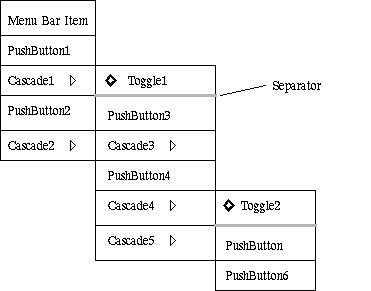
Figure 1-2 Three Level Customized Menu Hierarchy
Clicking on a push button or toggle button in the customized menu hierarchy
results in a call to its corresponding X Toolkit callback. This callback
may directly call an interactive Open C API, or create a persistent Motif
dialog.
Figure 1-3 shows the customized menu hierarchy created by the sample
code in mult_ufsta.c. The first level hierarchy contains four push buttons
and one cascade menu. The second level hierarchy contains a toggle button,
a separator, and three push buttons. In this example there is no third
level hierarchy.
Clicking on the Select button creates a Class Selection dialog. Clicking
on the Persistent Dialog buttons create persistent Motif dialogs, which
in turn call interactive Open C APIs.
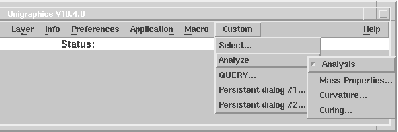
Figure 1-3 Sample Customized Menu Hierarchy
Refer to the description of UF_UI_append_menubar_menu() for an example
of the custom menu definition and creation.